User Guide
LoopLab for Chrome
Once your brain knows the pattern, you can hear it.
Step 1
Set up
- Add LoopLab to Chrome and pin its icon in the toolbar (the icon shows or hides the panel).
- Open the YouTube video you want to practice with and turn on subtitles (CC) in the language you are learning.
- The LoopLab panel appears on the right and loads the subtitles. If the list stays empty, wait a moment, then click Load Subtitles.
- The video starts paused (after a reload, at the spot where you left off). Press Play when you are ready.
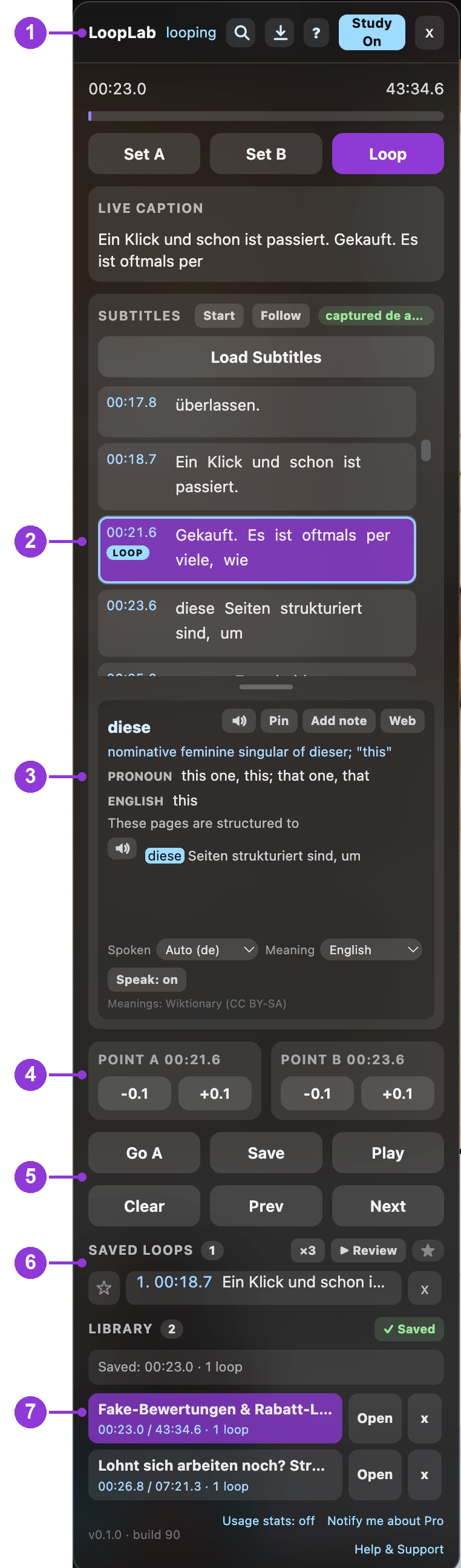
The panel at a glance
- 1Header: Search, Export, Help (?), Study On/Off, close
- 2Subtitle list: the violet row is playing now; LOOP marks the looping row
- 3Word card: meaning, pronunciation tips, translation, read-aloud
- 4Point A / Point B: fine-tune the loop start and end by 0.1 s
- 5Loop buttons: Go A, Save, Play, Clear, Prev, Next
- 6Saved loops: your kept loops, favorites, and Review
- 7Library: your study videos; resume where you left off
Step 2
Play and pause
- Press Space (YouTube's own key) or click Play in the panel. The same button reads Pause while the video plays.
- LoopLab's keys work while Study is On (panel header) and you are not typing in a text box.
Step 3
Loop one row
- Keyboard: press , (comma) to loop the row that is playing right now, the violet row. Press , again to release it.
- Mouse: click a row's time stamp (or the empty space around it) to loop that row. Click it again to release.
- The looping row gets a LOOP badge (number 2 in the picture above). . restarts it from the beginning; ← / → jump to the previous / next row.
- To release any loop: Shift+Z (or Shift+Space), or the Clear button.
Step 4
Loop several rows in a row
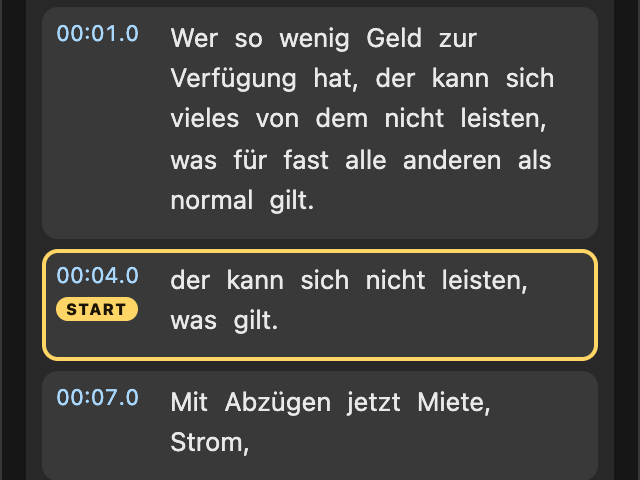
- Shift+click the first row's time stamp. The video pauses and the row is marked START, so the list holds still.
- Scroll to the last row you want (the list stays where you put it).
- Shift+click the last row's time stamp. Everything from the first to the last row loops, and playback starts again.
Shift+click START again to cancel. Shift+Z releases the loop.
Step 5
Loop a phrase (any length)
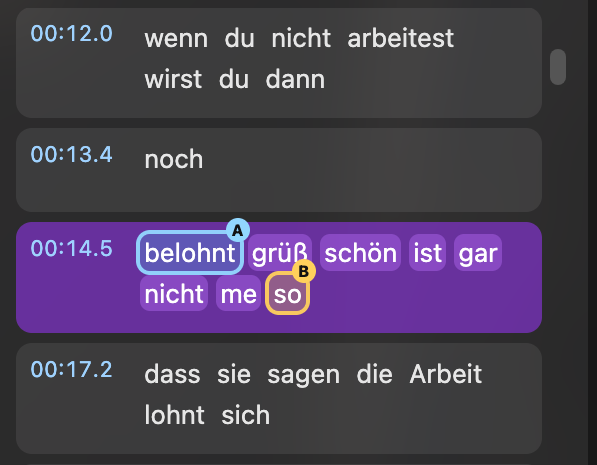
Option 1: click words. Click the word where the loop should start, then a later word where it should end. Click another word to move the nearest end; it can be in another row.
Option 2: A/B points. Click Set A (or Shift+A) at the start and Set B (or Shift+B) at the end. The loop starts at once; Loop turns it off and on. B alone stops playback there.
Step 6
Fine-tune a loop
- Use −0.1 / +0.1 under POINT A (loop start) and POINT B (loop end), number 4 in the panel picture.
- Handy when a word loop starts a little early or ends a little late: nudge until it sounds clean.
- A always stays at least 0.2 s before B; a red note explains when a step is not possible.
Step 7
Word meanings and read-aloud
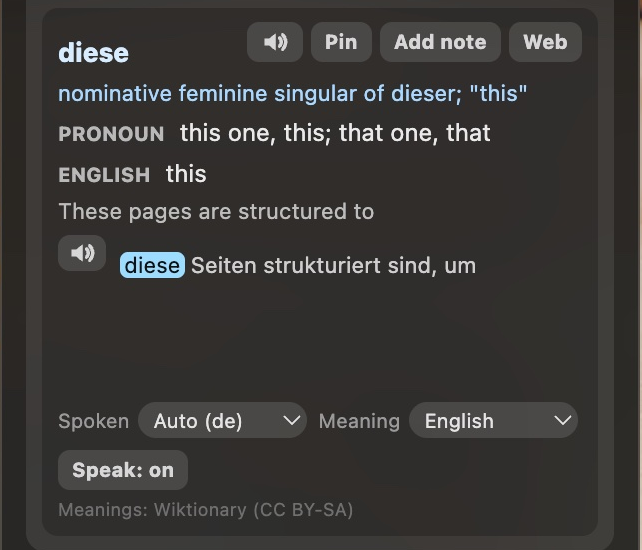
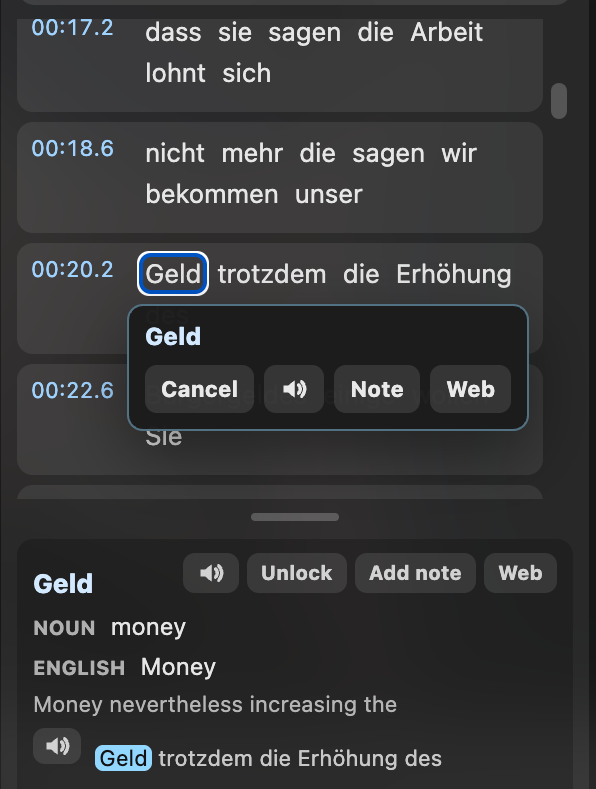
- Hover any word in the subtitle list to see it in the word card: meaning (Wiktionary, including base forms such as Abzügen → Abzug), part of speech, translation of the word and the line, and hearing tips for frequent German words. Long entries scroll inside the card.
- Shift+click a word to pause, hear it read aloud, and open the word menu:
- Cancel closes the menu
- 🔈 reads the word again (press twice for slow)
- Note adds your own note to the word
- Web opens the Collins dictionary entry in a new tab
- In the word card: 🔈 next to the line reads the whole line slowly, Pin keeps the word while you move the mouse, Speak: on/off turns the Shift+click readout off. Spoken and Meaning choose the video's language and the language of translations.
Step 8
Save, review, and your library
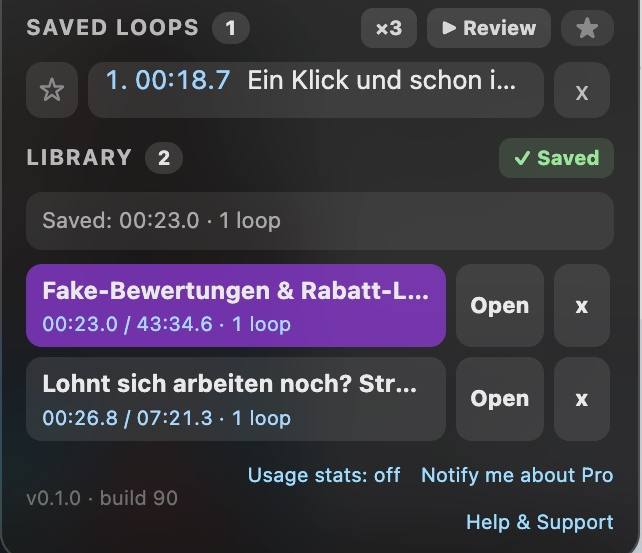
- While a loop is active, click Save. It appears under SAVED LOOPS with its subtitle text; click ☆ to make it a favorite, × to delete it. The video is added to your Library.
- Prev / Next step through the saved loops.
- Review plays your saved loops one after another, ×N each (click ×3 to choose 1 / 2 / 3 / 5). The ★ button limits it to favorites.
- LIBRARY lists your study videos with their position and number of loops. Open resumes where you left off; + Save Video adds the current video.
Step 9
Search
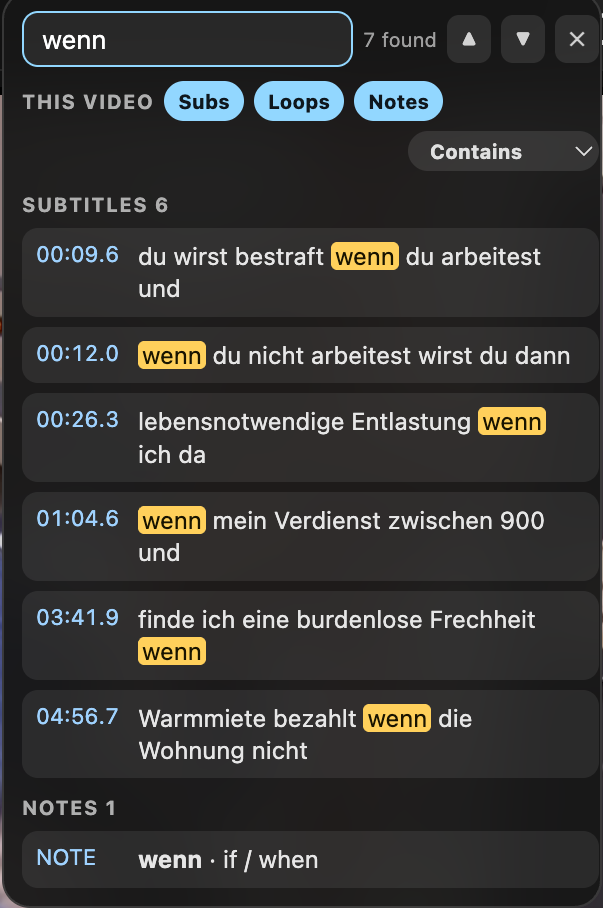
- Click the magnifier in the panel header. Search this video's subtitles, your saved loops, and your notes (choose with Subs / Loops / Notes).
- Click a result to loop that line or saved loop.
- Enter / Shift+Enter step through the results, Esc closes.
Step 10
Export and backup
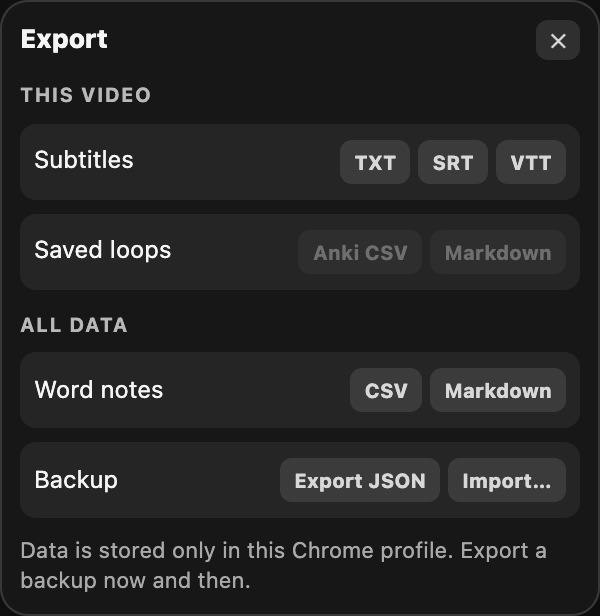
Click the download icon in the panel header:
- This video: subtitles (TXT, SRT, VTT), saved loops (Anki CSV, Markdown).
- All data: word notes (CSV, Markdown), and a full backup (Export JSON / Import).
Your loops, notes, and library live only in this Chrome profile. Export a backup now and then.
Step 11
Help and panel layout
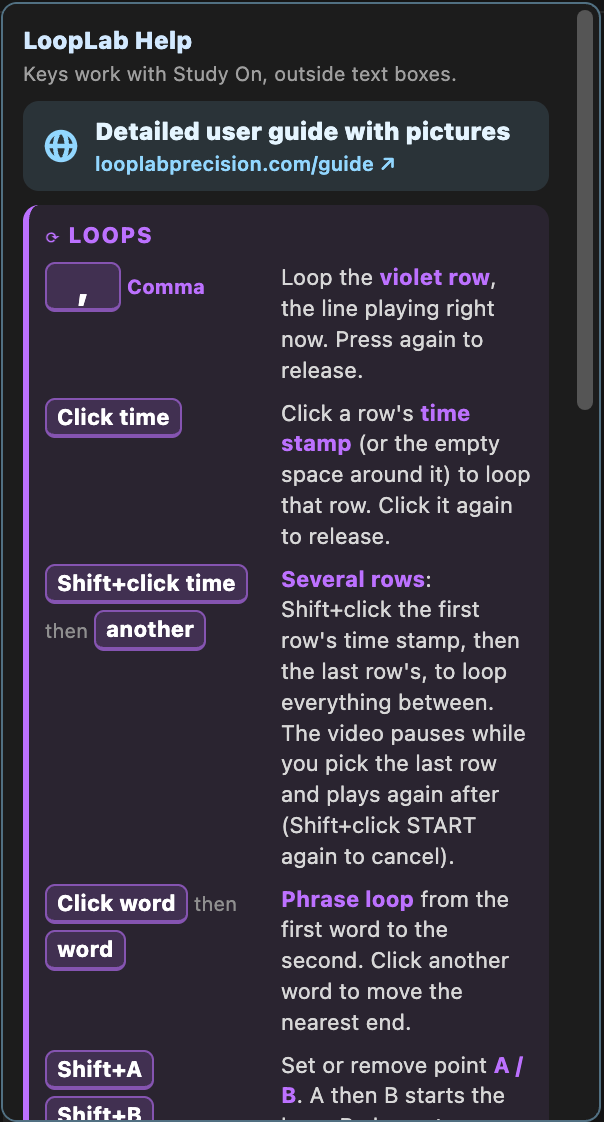
- Click ? in the panel header for the built-in key reference, with a link to this guide.
- Divider: drag the bar between the subtitle list and the word card. Down gives more rows and a smaller word card (at the bottom the card closes to a "▴ Word card" bar; click it to bring the card back). Up does the opposite. Double-click resets.
- Small screens: the panel never gets taller than the window; scroll inside the panel to reach Saved loops and Library.
- Scroll back: scroll the subtitle list to earlier rows while the video plays; it stays where you put it. Follow jumps back to the playing row.
- Move the panel by dragging its header. Close it with x; the LoopLab toolbar icon brings it back.
- Usage stats (panel footer) is off unless you agree to share anonymous feature-usage counts. Privacy policy.
Step 12
All keys
- , (comma)
- Loop the violet row (the line playing now); press again to release
- . (period)
- Restart the violet row from its beginning
- ← / →
- Previous / next row (YouTube's normal 5 s seek when no subtitles are loaded)
- Alt+← / Alt+→
- Move the violet row up / down in the list; playback continues
- Shift+A / Shift+B
- Set or remove point A / B; A then B starts the loop, B alone stops there
- Shift+Z or Shift+Space
- Clear the loop
- Shift+click a time stamp
- Mark the first row of a multi-row loop, then the last row
- Shift+click a word
- Pause, read the word aloud, open the word menu
- Two-finger swipe over the panel
- Previous / next row
- Search: Enter / Shift+Enter / Esc
- Next / previous result, close
Keys work while Study is On, outside text boxes.
Questions or ideas? Contact support.